Recently at Sigmoidal we had a curious case of filling PDF forms for our users. They can print them out pre-filled by us and then use them. We had plenty of those forms to set up, so an efficient way of doing it was required.
Solution 0: Putting Texts In Python
The simplest solution goes like this:
- Take an unfilled PDF form
- Create an empty canvas in Python
- Add texts to the canvas
- Merge
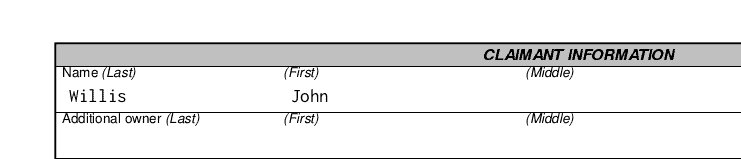
This can be done using pdfrw and reportlab libs. Quick example filling “John” and “Willis”:
import io

import pdfrw
from reportlab.pdfgen import canvas

def run():
    canvas_data = get_overlay_canvas()
    form = merge(canvas_data, template_path='./template.pdf')
    save(form, filename='merged.pdf')

def get_overlay_canvas() -> io.BytesIO:
    data = io.BytesIO()
    pdf = canvas.Canvas(data)
    pdf.drawString(x=33, y=550, text='Willis')
    pdf.drawString(x=148, y=550, text='John')
    pdf.save()
    data.seek(0)
    return data

def merge(overlay_canvas: io.BytesIO, template_path: str) -> io.BytesIO:
    template_pdf = pdfrw.PdfReader(template_path)
    overlay_pdf = pdfrw.PdfReader(overlay_canvas)
    for page, data in zip(template_pdf.pages, overlay_pdf.pages):
        overlay = pdfrw.PageMerge().add(data)[0]
        pdfrw.PageMerge(page).add(overlay).render()
    form = io.BytesIO()
    pdfrw.PdfWriter().write(form, template_pdf)
    form.seek(0)
    return form

def save(form: io.BytesIO, filename: str):
    with open(filename, 'wb') as f:
        f.write(form.read())

if __name__ == '__main__':
    run()
The result looks like this:
Pros:
- It works 🙂
Cons:
- We have a presentation layer in our code.
- Positioning texts is cumbersome (file watchers are a great help, but it still is a lot of manual labor).
- We have no information about width or height of our fields, long texts would need manual splitting in lines, changing font etc. We display texts from users, so we need automation here.
- With this solution our programmers started avoiding this code as long as they could. I didn’t like that and I had some ideas on how to improve it.
Solution 1: Save Fields Locations as a Vector Graphic
I’d prefer to visually position some rectangles as text fields on our document. My first idea was to use a vector graphics file:
- Save the PDF as an image
- Open it in vector graphics editor
- Add rectangles labeled with dictionary keys
- Save as a vector graphic
- Read the vector graphic in Python as a configuration for filling the PDF
I haven’t implemented this because I had a better idea (below), but I’d use SVG and some of many SVG libraries for Python. This format can have labeled shapes and we can read those and their locations in the backend.
Pros:
- separation of presentation and logic layers
- we have width and height of fields, we can compute how to position texts and what font size to pick
Cons:
- we have at least two files for a PDF (the PDF and one CSV per PDF’s page)
…which also makes it awkward to use in code - still we have a bit of presentation logic in our backend (picking font size and positioning)
So here we go to the better solution:
Solution 2: Use Fields From PDF
Nowadays PDFs can have fillable fields. A user can fill them and print the document. This seems fantastic because we could just fill them and even give our end user an ability to change them. All we need in our backend is to set default fields values to real user data and save.
Seems great, but I tested several open source libraries and they either can’t change those or can change fields’ attributes, but they don’t rerender them. So in the latter case, we are left with a file that has all the fields set, but they won’t display until a user clicks on a field and then defocuses. I’ve opened a ticket on pdfrw’s GitHub with this issue, hope it will be fixed.
So how do we solve it now? Just use those fields in the same manner as CSV rectangles proposed in Solution 1: make them invisible and use them as anchors for our additional texts:
- open the PDF in a PDF editor (Master PDF Editor seems nice and in its free Linux version it doesn’t add any watermark… yet)
- add invisible, read-only fields when your texts should be, make them as big as sensible (and as big as possible)
- label them with keys of your data dictionary on backend (be careful to make them unique, I use a suffix after dot and split labels by dots)
- save the PDF
- in backend use metadata from the PDF to position texts
We can get fields’ metadata like so:
for page in template.Root.Pages.Kids:
    for field in page.Annots:
        label = field.T
        sides_positions = field.Rect
Then use those to add fields from our data dict. Quick & dirty example:
data = io.BytesIO()
pdf = canvas.Canvas(data)
for page in template.Root.Pages.Kids:
    for field in page.Annots:
        label = field.T
        sides_positions = field.Rect
        left = min(sides_positions[0], sides_positions[2])
        bottom = min(sides_positions[1], sides_positions[3])
        user_data = {
            'last_name': 'Willis',
            'first_name': 'John',
        }
        value = user_data.get(label, '')
        padding = 10
        line_height = 15
        pdf.drawString(x=left + padding, y=bottom + padding + line_height, text=value)
    pdf.showPage()
pdf.save()
data.seek(0)
return data
(Please use some classes for representing fields metadata in your code.)
For example for this part of the form:
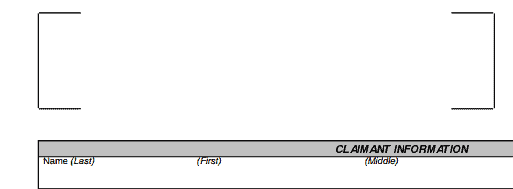
We can add fields:
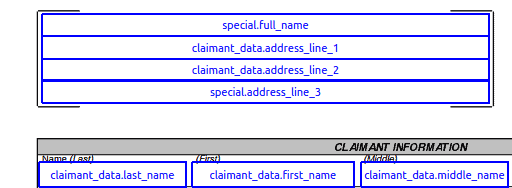
And after filling it looks like so:
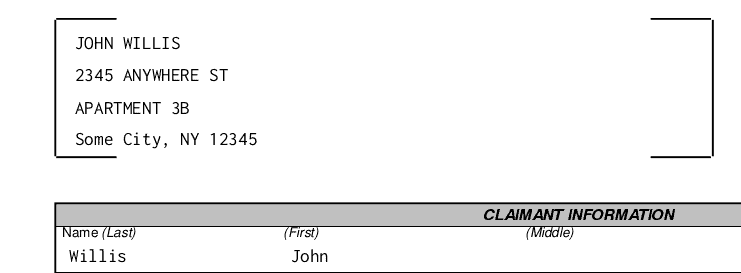
Pros:
- holding presentation layer in the PDF
- neat, clean & tidy
- we can compute best way to display long values because we have positions, widths and heights of every field
- we can add new forms without changing a line of code (we have a pattern for naming)
Cons:
- still we have a little bit of presentation logic on backend side (splitting lines, picking fonts, etc.)
- labels have to be unique (some random suffix possibly)
- changing of backend labels will require iterating over all files (the same problem like changing a source string in translations)
Solution 3: Use PDF Form’s Default Value
As mentioned in Solution 2, it can’t be done with tools I know. We can update it like so:
template = pdfrw.PdfReader('template.pdf')
template.Root.Pages.Kids[0].Annots[3].update(pdfrw.PdfDict(V='(test)'))
pdfrw.PdfWriter().write('test.pdf', template)
But it doesn’t re-render the fields so they are blank until focused and then defocused. It would be great if it worked.
Additional pros:
- handling font picking and too long lines on the presentation side
- user can change values before printing
- less code (less mess = God bless)
Summary
While the best solution is not reachable yet, the change gave us a great speedup. Now adding a new form is a breeze, especially because we can copy fields between PDFs in the editor. Hope to see rerendering of changed default values soon!