In this post I’m going to analyze the role of Docker in each stage of the application lifecycle and try to highlight cases when you should consider moving to Swarm. It’s not an introductory tutorial, but I’ll create one in the future.
Development with Docker
Docker really made my life much easier. Let’s just say, I need MySQL. Or Ghost (my blog is happily running on Ghost in docker container). Or Redis, postgreSQL, Ruby. It’s all already containerized, one docker run name_of_program_you_need line away. No more mess in my local workstation. I can download, use, and throw away. I can also easily extend existing containers, and I already know Docker is good enough to quickly tell if the image found on the internet is rubbish.Since you’re reading this post, I probably don’t need to convince you that Docker is a really great piece of software, especially for development.
If you are working with Docker, you are probably using Docker-compose for bringing up your whole development stack together. It can look like this:
version: '2'
services:
  web:
    build: .
    command: npm run dev
    ports:
      - 8080:80

  redis:
    image: redis

  database:
    image: postgres
and run with
docker-compose up # --build if you want to rebuildThe database is then reachable as postgresql://database, redis as http://redis. No more hardcoded addresses.
It’s a very convenient way of storing your development stack as code, inside a version control system. But what about production? It can’t be this easy, right? Yes it can!
Production requirements
Production is a very different beast. Let’s write down requirements for a typical medium traffic server.
- Availability: it just has to be working all the time, with as little downtimes as possible
- Performance: our server needs to handle traffic, so performance is important
- Easy deployment & rollback
- Gathering logs & metrics
- Load balancing: if something fails, we want our site to function properly
Docker, by many, is currently underestimated as a production-ready solution. I’ve decided to give it a shot, and almost a year ago I containerized everything under the hood of the PvP Center, product that I’m creating. There were some fails, related to docker filesystem (now I’m using overlay2 and everything works OK), but overall I think it was a very good decision.
Did you know that Docker can run your GPU app? Learn how to dockerize a GPU-powered Keras deep neural network to run in production and scale up!
Production deployment using raw Docker or Docker-compose
I’ve been there. I had an Ansible configuration for downloading a new version of the application and deploying every container (here you can find post about my base ansible configuration). It was working as desired. Let’s take a look at our list:
- Performance: Docker process is a normal kernel process, no noticeable overhead
- Easy deployment: one button and it’s happening. It took some time, because Ansible was checking multiple conditions, not just what version of the container was deployed (This could probably be fixed)
- Rollbacks: yes! I was storing every image of my application inside a Docker registry, with a separate tag. Rolling back was really easy, as I was doing backward-compatible database migrations
But it had some problems:
- It couldn’t be scaled to multiple hosts without effort of managing dynamic load balancer, which is non-trivial (Due to our need of 0-downtime deployment)
- It was tricky to figure out how to integrate it with CI / CD system
- I was storing application-specific deployment requirements in a separate architecture repository. When configuration changed, rollback was much harder.
I’ve stuck with it for some time. It was OK, but I had a feeling that I’m missing something. Too many hacks for zero-downtime deployment, not-so-DRY configuration, Ansible deployment started to irritate me (it was too slow).
But the real reason why I decided to move to Docker Swarm was scaling beyond one host. Potentially I could deploy an application in the same way to multiple hosts and use an external load balancer, but dynamically adding and removing them would quickly become a pain. I wanted to remove application specific configuration from Ansible and keep it in my application repository.
Docker Swarm
Docker Swarm is a relatively new addition to Docker (from version 1.12). It’s designed to easily manage container scheduling over multiple hosts, using Docker CLI.
- Main point: It allows to connect multiple hosts with Docker together.
- It’s relatively simple. Compared with Kubernetes, starting with Docker Swarm is really easy.
- High availability: there are two node types in cluster: master and worker. One of masters is the leader. If current leader fails, other master will become leader. If worker host fails, all containers will be rescheduled to other nodes.
- Declarative configuration. You tell what you want, how many replicas, and they’ll be automatically scheduled with respect to given constraints.
- Rolling updates: Swarm stores configuration for containers. If you update configuration, containers are updated in batches, so service by default will be available all the time.
- Built-in Service discovery and Load balancing: similar to load balancing done by Docker-Compose. You can reference other services using their names, it doesn’t matter where containers are stored, they will receive requests in a round-robin fashion.
- Overlay network: if you expose a port from a service, it’ll be available on any node in cluster. It really helps with external load balancing.
When to consider Docker Swarm
Here are 5 questions that you need to answer, before considering a move to Docker Swarm:
- Do you need scaling beyond one host? It’s always more complicated than single server, maybe you should just buy a better one?
- Do you need high availability?
- Are your containers truly stateless? Swarm containers shouldn’t use any volumes, theoretically it’s possible, but was not reliable when I tested it. Consider moving to S3 with media files and keep your database out of Swarm.
- Do you have log aggregation system, such as ELK stack (this applies to all distributed systems)?
- Do you need advanced features, available in more mature solutions (like Kubernetes)? Remember that getting familiar with Kubernetes is many times harder than with Swarm.
Experience in production
My application is using Swarm for 6 months now, migration from docker-compose took one week (including learning how to do this). I had to adjust my configuration to become truly stateless, and use external logs and metrics aggregators. At top-peak period I was using 35 nodes. Management of the cluster is easy, for example: docker service scale name_of_service=30 or docker service update -env-add SECRET_ENV=youdontneedtoknowit name_of_service. Here is a screen shot of a status of my services:

The deployment pipeline looks like this:
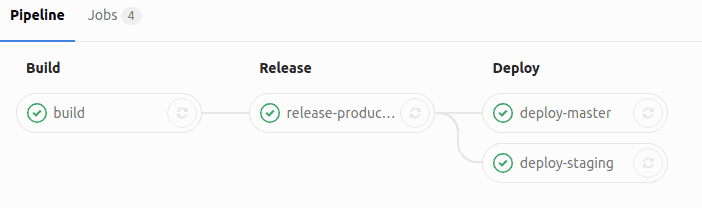
Using the newest Docker-compose v3 syntax with deploy section and Docker stack deploy command it’s easier than ever to store your application configuration in VCS and easily deploy it to the whole cluster without manual action. Example configuration:
version: '3'
services:
  web:
    image: registry.gitlab.com/example/example  # you need to use external image
    command: npm run prod
    ports:
      - 80:80
    deploy:
      replicas: 6
      update_config:
        parallelism: 2
        delay: 10s
      restart_policy:
        condition: on-failure
Whole deploy command is a one-liner: docker stack deploy application. Also, I’m using Gitlab.com pipelines, and with them it’s possible to achieve results like this:
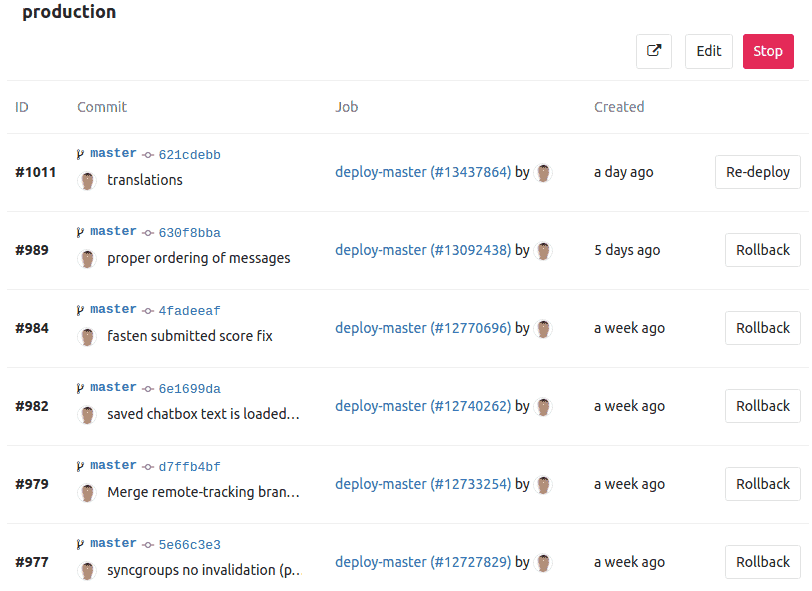
I can rollback to previous versions using web UI, even on mobile. And I love it!
This is my experience working with Docker Swarm. I’ve considered other options, but in my opinion, it’s currently the best choice if you just want to scale dockerized application to multiple hosts. Hope this post helped you! Next time I’ll write how to start with Docker Swarm, stay tuned!
(This content was originally posted on Jacob’s blog, rock-it.pl)